> ## Documentation Index
> Fetch the complete documentation index at: https://docs.seer.pm/llms.txt
> Use this file to discover all available pages before exploring further.
# Deposit wxDAI or sDAI
Besides xDAI, users with wXDAI or sDAI tokens in their wallets can also interact with Seer.
Most methods of obtaining wxDAI or sDAI require users to have xDAI first.
## Wrap xDAI
Wrap your xDai in [Wrap Eth](https://wrapeth.com/) connected with [MetaMask to Gnosis](https://docs.gnosischain.com/tools/wallets/metamask/).
## Interact with the respective smart contracts
Another way to convert xDAI to wxDAI or sDAI is to interact directly with their respective smart contracts on [Gnosis Block Explorer](https://gnosisscan.io/).
### wxDAI
Block Explorer Url:
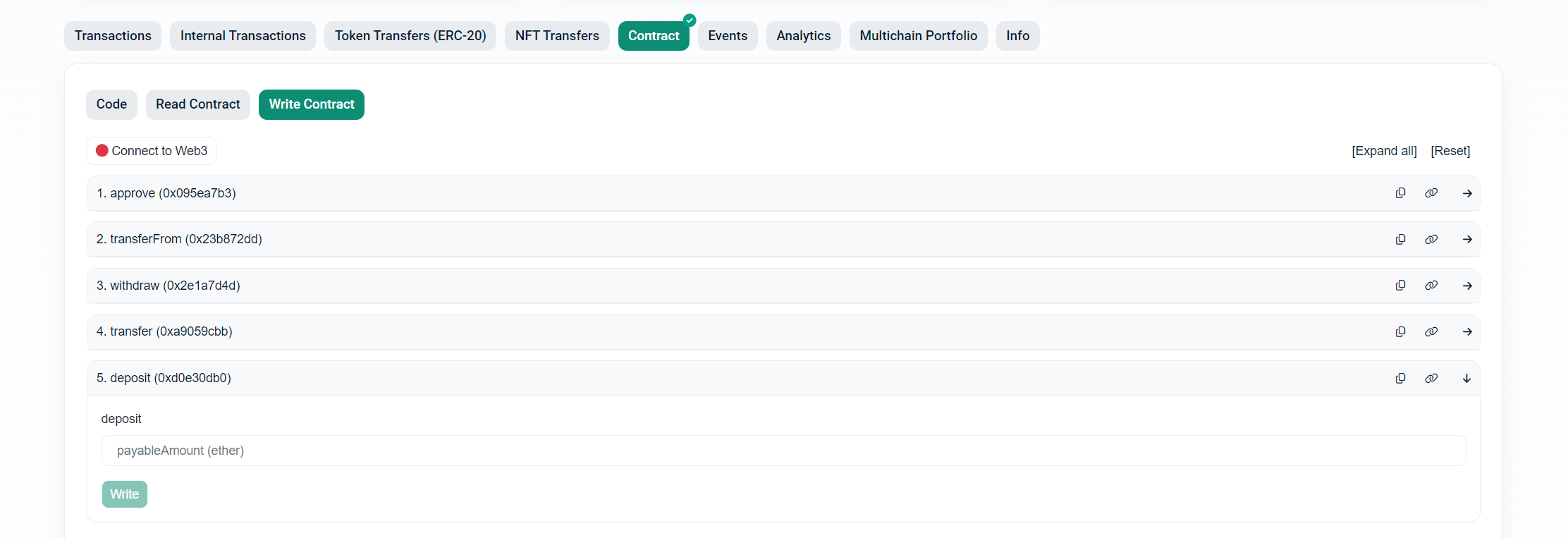
1. Visit the url, select **Contract** -> **Write Contract**.
2. Click **Connect to Web3** to connect your wallet. Make sure the network is **Gnosis**.
3. Under **deposit**, input the amount of xDAI you want to convert.
 ### sDAI
Block Explorer Url:
1. Visit the url, select **Contract** -> **Write Contract**.
2. Click **Connect to Web3** to connect your wallet. Make sure the network is **Gnosis**.
3. Under **depositXDAI**, input the amount of xDAI you want to convert and the receiver address (you can paste your wallet address here).
### sDAI
Block Explorer Url:
1. Visit the url, select **Contract** -> **Write Contract**.
2. Click **Connect to Web3** to connect your wallet. Make sure the network is **Gnosis**.
3. Under **depositXDAI**, input the amount of xDAI you want to convert and the receiver address (you can paste your wallet address here).
 ## Swap from other tokens
You can swap to wxDAI or sDAI on decentralized exchanges.
* [Swapr](https://swapr.eth.limo/#/swap?chainId=100)
* [Honeyswap](https://honeyswap.1hive.eth.limo/)
* [CowSwap](https://swap.cow.fi/#/100/swap/WXDAI)
This documentation is built and hosted on [Mintlify](https://mintlify.com), a developer documentation platform.
## Swap from other tokens
You can swap to wxDAI or sDAI on decentralized exchanges.
* [Swapr](https://swapr.eth.limo/#/swap?chainId=100)
* [Honeyswap](https://honeyswap.1hive.eth.limo/)
* [CowSwap](https://swap.cow.fi/#/100/swap/WXDAI)
This documentation is built and hosted on [Mintlify](https://mintlify.com), a developer documentation platform.